- 在domain control(DC) run powershell
- Import-Module activedirectory
- Search-ADAccount –LockedOut (列出被鎖的帳戶)
- Search-ADAccount -LockedOut | Unlock-ADAccount -Confirm (解開被鎖的帳戶)
Confirm這個參數一定要加,不然會一次全解開,連guest也解開,如此太不安全了 - 關閉powershell
2019年10月28日 星期一
利用PowerShell指令找出windows AD上被鎖的帳戶,Use PowerShell to Find Locked-Out User Accounts

2018年1月30日 星期二
利用powershell指令發email,一次發送多筆email及多個附加檔(attach files)
如果我們使用exchange server,可以利用指令的方式發送email。
可以利用exchange server的ps指令,Send-MailMessage or powershell配合 .net的一些方式來做。
利用指令還有一個好處就是可以定時發送。
我的需求是希望已類似合併列印的方式來發email,做一個csv檔,將每一筆要合併的資料放入,例如email address、人名、電話、要附加的檔案名稱、郵件內容....等,利用powershell執行一程式直接合併後email給收件人。
國外有很多的例子可以參考,如要引用的話要針對自己的環境修改哦,整理了我有使用的如下,(我依我的環境更改後,它是work的)
參考Chris's Blog如下:
做一個類似下圖的csv檔
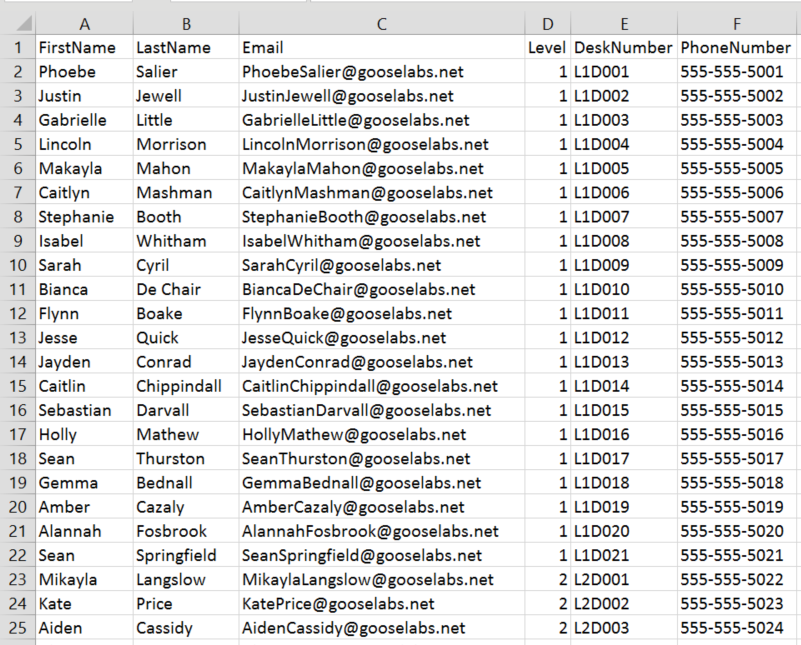
script如下: 一定要依自己的環境更改以下的變數。
--------------------------------------------------------------------------------
一封信發多個檔案script 資料by Ben Denford
https://community.spiceworks.com/scripts/show/2038-powershell-email-all-files-in-folder
Powershell Email All files in folder
Powershell Email with multiple attachment
可以利用exchange server的ps指令,Send-MailMessage or powershell配合 .net的一些方式來做。
利用指令還有一個好處就是可以定時發送。
我的需求是希望已類似合併列印的方式來發email,做一個csv檔,將每一筆要合併的資料放入,例如email address、人名、電話、要附加的檔案名稱、郵件內容....等,利用powershell執行一程式直接合併後email給收件人。
國外有很多的例子可以參考,如要引用的話要針對自己的環境修改哦,整理了我有使用的如下,(我依我的環境更改後,它是work的)
參考Chris's Blog如下:
做一個類似下圖的csv檔
script如下: 一定要依自己的環境更改以下的變數。
# Function to create report emailfunction SendNotification{ $Msg = New-Object Net.Mail.MailMessage $Smtp = New-Object Net.Mail.SmtpClient($ExchangeServer) $Msg.From = $FromAddress $Msg.To.Add($ToAddress) $Msg.Subject = "Announcement: Important information about your office relocation." $Msg.Body = $EmailBody $Msg.IsBodyHTML = $true $Smtp.Send($Msg)}# Define local Exchange server info for message relay. Ensure that any servers running this script have permission to relay.$ExchangeServer = "yourexchange.domain.com"$FromAddress = "Office Relocation Team " # Import user list and information from .CSV file$Users = Import-Csv UserList.csv# Send notification to each user in the listForeach ($User in $Users) { $ToAddress = $User.Email $Name = $User.FirstName $Level = $User.Level $DeskNum = $User.DeskNumber $PhoneNum = $User.PhoneNumber $EmailBody = @" Dear $Name, As you know we will be relocating to our new offices at 742 Evergreen Terrace, Springfield on July 1, 2015. This email contains important information to help you get settled as quickly as possible. Your existing access card will grant you access to the new building and your desk location is as follows: Level: $Level Desk Number: $DeskNum Phone Number: $PhoneNum Your new phone will be connected and ready for use when you arrive. If you require any assistance during the move please contact the relocation helpdesk at relocation@gooselabs.net or by calling 555-555-1234 Regards, Office Relocation Team "@ Write-Host "Sending notification to $Name ($ToAddress)" -ForegroundColor Yellow SendNotification}--------------------------------------------------------------------------------
一封信發多個檔案script 資料by Ben Denford
https://community.spiceworks.com/scripts/show/2038-powershell-email-all-files-in-folder
Powershell Email All files in folder
Powershell Email with multiple attachment
#Connection Details
$username=”john”
$password=”password”
$smtpServer = “mail.server.local”
$msg = new-object Net.Mail.MailMessage

#Change port number for SSL to 587
$smtp = New-Object Net.Mail.SmtpClient($SmtpServer, 25)

#Uncomment Next line for SSL
#$smtp.EnableSsl = $true
#下一行如果沒有可以mark可來
$smtp.Credentials = New-Object System.Net.NetworkCredential( $username, $password )

#From Address
$msg.From = "john@gmail.com"
#To Address, Copy the below line for multiple recipients
$msg.To.Add(“test@gmail.com”)

#Message Body
$msg.Body=”Please See Attached Files”

#Message Subject
$msg.Subject = “Email with Multiple Attachments”

#your file location
$files=Get-ChildItem “C:\Reports\”

Foreach($file in $files)
{
Write-Host “Attaching File :- ” $file
$attachment = New-Object System.Net.Mail.Attachment –ArgumentList C:\Reports\$file
$msg.Attachments.Add($attachment)

}
$smtp.Send($msg)
$attachment.Dispose();
$msg.Dispose();
訂閱:
文章 (Atom)